<?xml version="1.0" encoding="utf-8"?>
<feed xmlns="http://www.w3.org/2005/Atom" xml:lang="en-us">
  <title>HELO, world</title>
  <subtitle>Field notes from the engineers building email security at Mailprotector.</subtitle>
  <link href="https://mailprotector.engineering/feed/main" rel="self"/>
  <link href="https://mailprotector.engineering/"/>
  <id>https://mailprotector.engineering/</id>
  <updated>2026-07-22T13:00:00.000Z</updated>
  <entry>
    <title>Deployment Control: deploy today, roll out at your pace</title>
    <link href="https://mailprotector.engineering/articles/shield-deployment-control/"/>
    <id>https://mailprotector.engineering/articles/shield-deployment-control/</id>
    <updated>2026-07-22T13:00:00.000Z</updated>
    <published>2026-07-22T13:00:00.000Z</published>
    <author><name>Ben Hathaway</name></author>
    <summary>The engineering story behind Shield&apos;s Deployment Control release: how deployment and rollout became separate steps, how health checks gate enablement, and the routing redesign that removed DNS from the process.</summary>
    <content type="html"><![CDATA[<p>We have been deploying <a href="https://mailprotector.com/products/shield/">Shield</a> into Microsoft
365 tenants for about three years, and for most of that time the experience was a wizard:
click the button, watch the progress indicator, get green or red. That design came from the
same philosophy as Shield’s end-user experience, where removing complexity is the whole point.
Carried over to the administrator’s side of the product, it was the wrong tradeoff, and this
release moves in the other direction.</p>
<p>The release is called <strong>Deployment Control</strong>. It covers four capabilities: transparent
deployment, health monitoring, staged rollout, and zero-configuration routing. Here is what
actually changed in how Shield gets into a tenant, and the design decisions underneath.</p>
<h2>Deployment and rollout are different jobs</h2>
<p>The release starts with a definition, because our own language had been getting in the way.
“Deploying Shield” used to mean both installing the product and turning it on, in one trip
through a wizard, and that coupling made the first click carry all of the risk.</p>
<p>The two jobs are now separate, with separate names. <strong>Deployment</strong> is the one-time setup: it
registers Shield’s enterprise application with the permissions the administrator consents to,
creates the mail connectors, and puts in place the configuration Shield needs to work
with the tenant. Running it changes nothing about mail flow. <strong>Rollout</strong> is enabling Shield
for users, and it is the only step that changes whose mail Shield handles. Under the hood,
enabling or disabling a user changes membership in the security groups that the tenant’s
<a href="https://mailprotector.engineering/articles/shield-mail-flow-evolution/">mail routing keys on</a>. Nothing is redeployed in
either direction; membership alone determines whether Shield touches that user’s mail.</p>
<p>Everything else in the release builds on that split. An administrator can deploy in the
middle of a workday, verify the result, and enable users whenever it makes sense: that
evening, next week, or one department at a time.</p>
<h2>Transparent deployment</h2>
<p>Deployment runs as a series of tasks against the Microsoft 365 tenant, and the new
deployment view shows each task as the deployment engine runs it: the command, live progress,
timestamped logs, and the complete API responses coming back from Microsoft. The history is
kept after the run, so an administrator and our support team can open the same deployment and
read the same output. If a task fails, the administrator can correct the tenant-side problem
and run it again from the same screen.</p>
<p>The design borrows from CI/CD tooling, the run views in GitHub Actions or a Cloudflare
Pages deploy, which settled on the right pattern years ago: a remote operation should show
its progress while it runs, preserve its output afterward, and let the operator retry a
failed step once the underlying cause is fixed.</p>
<p>This matters for Shield because a deployment’s outcome depends heavily on
the tenant it runs against. A tenant setting that is incompatible with Shield is not
something we can fix from our side, but the administrator has to be able to see it before
they can. The clearest example is permission propagation. Grant a permission to an
application in Microsoft 365 and it may take effect in seconds, or hours, or days; Microsoft’s
own admin tools sometimes estimate “a few hours to a few days” for changes to apply. Nearly
every deployment failure our team hit during beta traced back to permissions that had been
granted but had not finished propagating. In the old wizard, that failure looked like Shield
was broken. In the new view, it reads as what it is: a specific request that Microsoft
rejected, waiting on Microsoft’s own timeline. We are also feeding those captured responses
back into the deployment engine to tune its retry timing, so waiting out propagation becomes
the engine’s job instead of the administrator’s.</p>
<p>A full deployment run takes around ten minutes, and nearly all of that is waiting on
Microsoft to respond. Nothing requires babysitting; start it, do something else, and read the
results when it finishes.</p>
<p>The visibility also answers a fair question administrators have been asking since Shield
first shipped: what changes is Shield making to my tenant? Consenting to Shield’s enterprise application means approving a long list of
tenant permissions up front, and approving a list is very different from understanding it.
Watching the deployment execute shows what those permissions are actually used for, command
by command.</p>
<p>One more piece rides along with this. Shield has had <a href="https://mailprotector.engineering/articles/shield-mail-flow-evolution/">three generations of mail flow
architecture</a>, Alpha, Bravo, and Charlie, and some
longstanding tenants are still on Alpha or Bravo because there was never a clean mechanism to
upgrade. The organization page now identifies a legacy configuration with a banner and lets
the administrator move to Charlie themselves, using the same transparent deployment
machinery, without a support ticket.</p>
<h2>Health monitoring</h2>
<p>A deployed tenant does not stay deployed on its own. Anyone with sufficient rights can change
a connector, revoke a permission, or alter configuration Shield depends on, and Microsoft can
change behavior on its side too. We have had cases where someone spotted the unfamiliar
Shield application in their Microsoft admin panel days after deployment and deleted it, which
removes every permission Shield has. In the old world, all of these surfaced the same way: as
an apparent Shield bug, reported through a ticket, escalating to our engineering team before
anyone could see what had actually changed.</p>
<p>Health monitoring makes that state inspectable. <strong>Health Pages</strong> are built from individual
checks we call <strong>Pulses</strong>. Each Pulse runs commands against Microsoft to compare the state a
piece of configuration should be in against the state it is actually in, at the organization,
domain, or user level, since Shield has requirements at all three. An administrator runs the
checks on demand, most often right after a deployment. During setup, a failing Pulse gates
enablement: users cannot be activated onto a configuration Shield already knows is broken.</p>
<p>When a Pulse fails, the page shows the expected state next to the found state and explains
the consequence in plain language. Where Shield can fix the problem, there is a one-click
repair; where it can’t, there are instructions for the change the administrator needs to
make. Either way, re-running the Pulse confirms the result without a ticket.</p>
<p>Repair is deliberately a button rather than an automatic correction. The tenant belongs to
the administrator, and a security product silently rewriting its configuration is exactly the
behavior administrators distrust. Just as important, drift is evidence. A setting that keeps
changing back is a signal worth investigating, maybe a script, maybe a person with global
admin rights making changes nobody knows about, and auto-repair would erase that trail before
anyone saw it.</p>
<p>One boundary to be clear about: in this release, health checks run on demand. Shield does not
yet notify anyone when an organization moves from healthy to unhealthy. Notifications on
state change are planned work; making the state visible, explainable, and repairable came
first.</p>
<h2>Staged rollout</h2>
<p>Once a tenant is deployed and healthy, rollout happens at whatever pace the administrator
chooses: one user, a group, or the whole organization at once. Each user is an independent
toggle, and the toggle works in both directions.</p>
<p>Disabling a user removes Shield from their mail entirely; nothing passes through unfiltered
because nothing passes through at all. Handling returns to what it was before, which
includes Microsoft’s Exchange Online Protection, the platform-level filtering that cannot be
turned off. A user Shield is not handling yet, or has been pulled back from, keeps that
baseline protection.</p>
<p>The per-user switch covers a set of situations that used to have only organization-sized
answers. A pilot user can run Shield before the rest of the company, in a ten-seat shop as
usefully as in a thousand-seat one. A mailbox with an unusual rule or integration can be
pulled out of Shield to isolate a problem, then re-enabled once it’s understood, without
disturbing anyone else. Service mailboxes feeding ticketing systems and CRMs can be excluded
individually instead of engineering around them.</p>
<p>It also changes migrations. Because activation is per-user, an organization moving from an
API-based security product can run both during the transition, split user by user. That does
not extend to gateway products, <a href="https://mailprotector.com/products/cloudfilter">CloudFilter</a> included, because a gateway takes the domain’s
MX records and filters everything behind them; there is no per-user split of an MX record.
Shield can still be deployed while the gateway is in place, though, so the cutover itself
can be quick.</p>
<h2>Zero-configuration routing</h2>
<p>The largest engineering change in the release is the one administrators will notice least,
because it shows up as an absence. <strong>For a tenant already routing mail through Microsoft 365,
deploying Shield changes no DNS at all: no MX records, no SPF, no DKIM, no DMARC.</strong></p>
<p>The change behind that absence is Charlie, the third generation of Shield’s mail flow. The
<a href="https://mailprotector.engineering/articles/shield-mail-flow-evolution/">evolution of Shield’s mail flow design</a>, from
Alpha’s hand-edited MX records through Bravo’s connectors and shared certificate, is its own
story. The part that matters for deployment
is that Shield no longer does final delivery. Outbound mail is inspected and handed back to
the customer’s own tenant, where Microsoft delivers it from its own infrastructure and
DKIM-signs it with the customer’s existing keys. Because Shield never sends as the customer,
there is nothing to authorize in anyone’s SPF, no DKIM records to publish per domain, and no
propagation to wait out. If a domain’s records were right before Shield, they are right
after; if they were wrong before, the health checks will say so, but that misconfiguration
was there before Shield was.</p>
<p>Inbound needs no DNS either. The MX record stays pointed at Microsoft 365, and transport
rules inside the tenant route mail to Shield by user rather than by domain. Each direction
keys on its own security group, one inbound and one outbound; rollout keeps the two in step
today, but they are deliberately separate mechanisms, so each direction stays independently
controllable.</p>
<p>The relay back into the tenant rides on a certificate identity unique to each tenant,
provisioned during deployment without customer DNS changes. That design came out of our
internal testing, which tripped an undocumented Exchange Online attribution rule and
took our own tenant’s outbound down for two days; the postmortem covers <a href="https://mailprotector.engineering/articles/how-microsoft-decides-which-tenant/">how Microsoft 365
decides which tenant email belongs to</a>.</p>
<p>Handing final delivery to Microsoft has a second effect: shared IP reputation stops being a
coupling point between customers. When Shield delivered mail itself, a compromised account at
one customer could land a shared delivery IP on a blocklist and degrade delivery for
everyone using it. Now each tenant’s mail leaves from Microsoft’s infrastructure under that
tenant’s own identity, and there is no shared reputation pool for us to manage or for
customers to inherit from each other.</p>
<p>The one caveat on “no DNS changes”: an organization leaving a traditional gateway,
ours included, still has to point its MX records back at Microsoft 365. That change
belongs to the gateway migration itself, and it can happen ahead of time, with Shield
deployed and verified before any users are enabled.</p>
<h2>Available today</h2>
<p>Internal testing has been running since late June, and it is what hit the attribution
incident above: we rolled back, rebuilt the identity model, and started again. Partner beta
testing began at the beginning of July. Earlier this month we moved our own corporate tenant
onto the new deployment without announcing it, and nobody noticed, which for a mail-flow
change is the result we wanted. As of today, Deployment Control is generally available.</p>
<p>The whole release comes down to a sequence: deploy without touching mail flow,
verify the tenant is healthy, then enable the right users at the right time, with a way back
for any one of them. Every capability above exists to make some part of that sequence
visible, checkable, or reversible. The measure of success is the one from our own tenant’s
migration: mail kept moving, and nobody had a reason to ask what changed.</p>
]]></content>
    <category term="Releases"/>
    <category term="Shield"/>
    <category term="Deployment"/>
    <category term="Microsoft 365"/>
  </entry>
  <entry>
    <title>The evolution of Shield&apos;s mail flow architecture</title>
    <link href="https://mailprotector.engineering/articles/shield-mail-flow-evolution/"/>
    <id>https://mailprotector.engineering/articles/shield-mail-flow-evolution/</id>
    <updated>2026-07-21T13:00:00.000Z</updated>
    <published>2026-07-21T13:00:00.000Z</published>
    <author><name>Christian Maddox</name></author>
    <summary>Three versions of Shield&apos;s mail flow architecture, from a blunt MX record to a design that hands the last mile back to Microsoft, and what changed each time along the way.</summary>
    <content type="html"><![CDATA[<p>Put an email security layer in front of Microsoft 365 and every message crossing it has to answer the same three questions: how does it get routed to us in the first place, who does the final delivery, and how much of that setup depends on the customer’s own DNS. <a href="https://mailprotector.com/products/shield/">Shield</a> has answered those questions three times, with three mail flow designs we call Alpha, Bravo, and Charlie. Alpha is the design Shield launched with in March 2024, Bravo followed in January 2025, and Charlie is rolling out this month. This post covers how the design evolved across those three versions, and how we ended up handing the last mile, the final hop that delivers a message to its destination, back to Microsoft.</p>
<p>Shield is built around three SMTP gateways, each of which started as a standalone SMTP server with one job. Frontline is the inbound edge: mail headed toward a customer arrives here first, at <code>&lt;domain&gt;.in.shield.security</code>. Outpost is the outbound edge, <code>&lt;domain&gt;.out.shield.security</code>, where a customer’s own outgoing mail lands. Courier is the last mile, the mail server that takes a scanned message and hands it to wherever it’s ultimately going. Each gateway drops the message on a queue, and the Shield app pulls it off to do the actual filtering. Those three roles carry through every version, though not always as the same software. What changed across Alpha, Bravo, and Charlie was how Microsoft knows when to route mail to Shield, and how the last mile delivery is handled.</p>
<h2>Alpha: point the MX at Shield</h2>
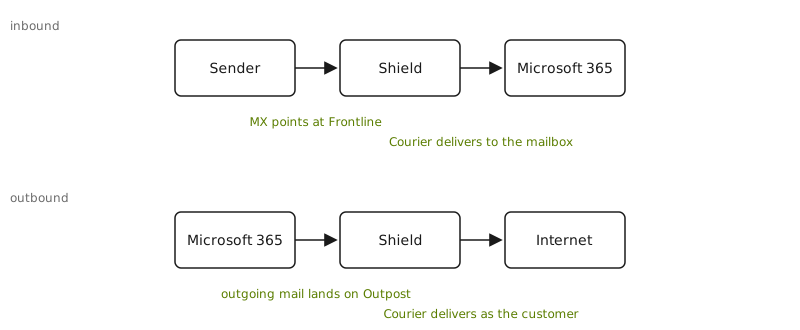
<p>The first version was the bluntest thing that works. To put a domain behind Shield, you changed its MX record to point at Frontline. That was the entire inbound setup. Mail from the internet looked up the domain, found Frontline, and delivered there first, before Microsoft ever saw it. There was no transport rule and no connector in the customer’s Microsoft 365 tenant routing anything to us, because there was nothing to route: the public MX record already sent every inbound message our way. We filtered it, and Courier delivered it on to the mailbox.</p>
<p><img src="https://mailprotector.engineering/diagrams/shield-mailflow-alpha.svg" alt="Alpha mail flow. Inbound: mail goes from the sender straight to Shield because the MX record points at Frontline, then Courier delivers it to Microsoft 365. Outbound: mail leaves Microsoft 365 for Shield's Outpost gateway, then Courier delivers it to the internet as the customer."></p>
<p>On its way outbound, a customer’s outgoing mail left Microsoft, went to Outpost, got filtered, and Courier delivered it to the world. Because Courier was sending as the customer’s domain, the customer’s DNS had to say so: an SPF update to authorize our infrastructure, and DKIM records so the mail we sent on their behalf verified. Without those, everything we relayed outbound looked like a forgery to the receiving side.</p>
<p>All of it depended on DNS, and DNS was the part that hurt. There was no Entri integration yet to automate DNS changes for customers, so every record was edited by hand, one domain at a time, in whatever registrar or DNS host the customer happened to use. Then you waited. A record is not live because you saved it; it’s live once it has propagated, and until then you can’t verify the domain is set up correctly. A customer with a dozen domains went through a dozen rounds of the same manual change and the same wait. It was the slowest and most failure-prone part of every onboarding, and it got worse in a straight line with how many domains a customer brought. Everything that came after Alpha was, one way or another, an attempt to spend less time waiting on someone else’s DNS.</p>
<p>Alpha’s inbound design rested on that MX record. Routing a domain through Shield was all or nothing, decided once in the DNS zone. We owned last-mile delivery in both directions, which meant we also owned the deliverability of every message we sent, with the customer’s reputation riding on records we’d asked them to publish.</p>
<h2>Bravo: go MX-less with connectors</h2>
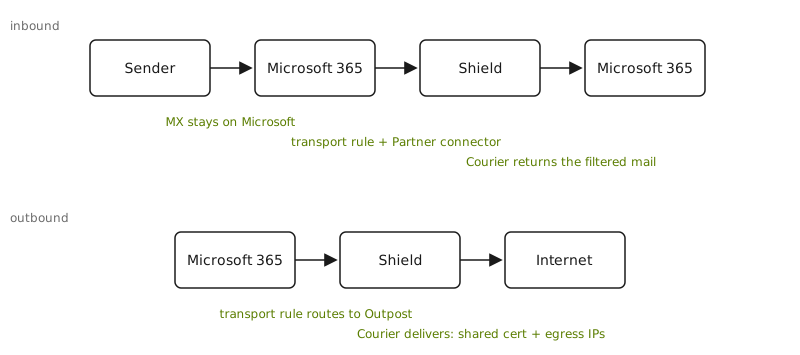
<p>Bravo set out to eliminate the MX record change. Instead of relying on the public MX record to divert inbound mail, we configured Exchange Online directly, with connectors and transport rules. Connectors are how Exchange Online exchanges mail with an outside system, and transport rules decide which messages get sent through them. The MX record stayed wherever it already was; pointing it at Frontline dropped from a requirement to optional. The three gateways stayed put; what changed was how Microsoft handed mail to them.</p>
<p><img src="https://mailprotector.engineering/diagrams/shield-mailflow-bravo.svg" alt="Bravo mail flow. Inbound: mail arrives at Microsoft 365 first because the MX record stays put, a transport rule and Partner connector route it to Shield, and Courier returns the filtered mail to Microsoft 365. Outbound: a transport rule routes mail from Microsoft 365 to Shield, then Courier delivers it to the internet using the shared certificate and egress IPs."></p>
<p>The rules routed by domain. Inbound, a transport rule matched on the recipient domain with <code>RecipientDomainIs</code> and sent the message out a Partner connector aimed at Frontline. Outbound matched on the sender domain with <code>SenderDomainIs</code> and routed to Outpost. To keep the loop from feeding on itself, and to skip Microsoft’s own spam filtering on mail we’d already scanned, the rules also keyed on our egress addresses with <code>SenderIpRanges</code>, drawn from the pool of IPs Courier sent from. The connectors trusted us by a shared TLS certificate, <code>*.shield.security</code>, and by that same IP list.</p>
<p>Last-mile delivery was unchanged from Alpha. Inbound, Courier handed the filtered message back to Microsoft 365 for mailbox delivery, which is why the transport rules needed that IP-range exception: without it, the returning mail would match the inbound rule and route straight back out to Shield. Outbound, Courier still relayed the finished message to the internet, carrying the envelope details along with each message and communicating delivery results back to Shield.</p>
<p>Bravo was a real gain in control, but it did not eliminate the DNS work. We now DNS-verified the customer’s domains and set them as <code>InternalRelay</code> accepted domains in the tenant (an accepted domain is one the tenant agrees to handle mail for), so onboarding still walked domain by domain and still waited on propagation before a domain would verify. Routing by IP added its own upkeep: Courier’s egress addresses were pinned into every connector and every transport rule, so when that pool changed, the change had to fan out to every tenant we managed. And the shared certificate, the one identity every customer’s Courier traffic presented, was a coupling we didn’t fully appreciate until it bit us. That’s <a href="https://mailprotector.engineering/articles/how-microsoft-decides-which-tenant/">its own story</a>, and a key factor in the design of the next version.</p>
<p>Bravo’s routing was more precise than a blanket MX record, matching on domain and IP instead, but it was still domain-shaped and still all or nothing per domain. And the precision had a cost: we now kept lists of domains and IPs synchronized across every tenant, and every tenant’s Courier traffic leaned on the same shared certificate.</p>
<h2>Charlie: route by user, give the last mile back to Microsoft</h2>
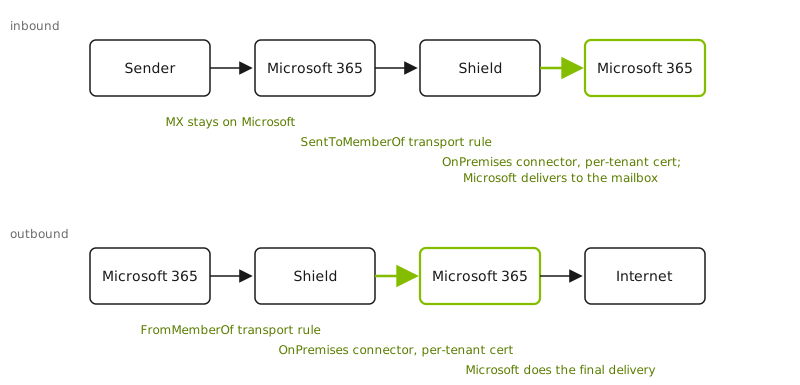
<p>Charlie made two changes, each big on its own. The last mile moved back to Microsoft: instead of Shield delivering to the internet or the mailbox ourselves, Microsoft does the final delivery. And routing moved to group membership: whether mail flows through Shield is now decided per user rather than per domain, with trust resting on a per-tenant TLS certificate instead of domains and IP addresses. Together they add up to what we call zero-configuration routing: mail reaches Shield and comes back without the customer changing an MX record, publishing a DNS record, or maintaining any per-domain setup.</p>
<p><img src="https://mailprotector.engineering/diagrams/shield-mailflow-charlie.svg" alt="Charlie mail flow. Inbound: mail arrives at Microsoft 365, a group-membership transport rule routes it to Shield, and Shield relays it back into the tenant over an OnPremises connector with a per-tenant certificate for Microsoft to deliver to the mailbox. Outbound: a group-membership rule routes mail to Shield, Shield relays it back into the tenant the same way, and Microsoft does the final delivery to the internet."></p>
<p>Start with DNS, since that’s the part that kept hurting. In Charlie the MX record stays on Microsoft. From the internet’s point of view the customer’s mail flow looks like an ordinary Microsoft 365 tenant: SPF points at <code>spf.protection.outlook.com</code>, DKIM is Microsoft’s. We no longer ask the customer to authorize our infrastructure to send as them, because we no longer do the final internet delivery. The last mile hands the mail back to Microsoft, and Microsoft delivers it, so DKIM signing became Microsoft’s job. That eliminated the biggest chunk of deployment DNS work: there are no DKIM records to publish for each domain, because the customer’s existing keys in Microsoft 365 keep doing the signing. The order of operations matters too. Microsoft signs each message at the final hop, after Shield has made its last changes (removing the HUD, applying Workflows), so the message that goes out to the world always carries a valid signature. The only domain Shield verifies is one we own end to end, a per-tenant <code>courier</code> hostname under a zone we control. Customer DNS comes off the onboarding critical path, and with it the per-domain, wait-for-propagation loop that made Alpha and Bravo slow.</p>
<p>Routing changed to match. The transport rules no longer key on the customer’s domains or on our IPs. Inbound routes on membership in a mail-enabled security group with <code>SentToMemberOf</code>, outbound on the sending group with <code>FromMemberOf</code>, which makes routing through Shield a property of group membership instead of a blanket per-domain switch. In place of the IP-range exception that used to keep filtered mail from looping, the rules recognize mail Shield has already processed by a secret scoped to the tenant. Group membership and a scoped secret, both belonging to the one tenant, replace the domain lists and the shared IP pool.</p>
<p>Routing at the user level is what makes a partial rollout possible. Deploying Charlie prepares the tenant, the connectors, the transport rules, the certificate, and the security group, without changing mail flow for anyone, because rules that match on group membership match nobody until the group has members. An admin can add a few users, watch Shield handle their mail for a few days, then roll out the rest of the organization. In Alpha and Bravo that decision was all or nothing per domain; one of our partners called it the “YOLO” approach to deploying. In Charlie, inbound and outbound routing follow the user.</p>
<p>The last mile changed the most. Filtered mail now returns to the tenant in both directions: Microsoft delivers inbound messages to the mailbox and relays outbound messages on to the internet. The inbound connector that accepts that relayed mail flipped from a Partner connector to an OnPremises one, which is what lets it relay back out through the tenant, and it dropped the IP pin in favor of a certificate. This time each tenant gets its own certificate instead of the shared <code>*.shield.security</code> cert, and its domain is that tenant’s verified <code>courier</code> accepted domain. For an OnPremises connector Microsoft attributes traffic by the certificate the sender presents, so a per-tenant certificate keeps every tenant’s mail attributed to itself and to nobody else. We learned that rule the hard way and <a href="https://mailprotector.engineering/articles/how-microsoft-decides-which-tenant/">wrote it up</a>.</p>
<p>Courier itself stopped being a separate SMTP server. Once the last mile went back to Microsoft, Courier no longer had to be a full internet-facing mail server; it just had to open one authenticated SMTP session into a tenant. So we moved it inside the Shield app as a built-in delivery step. It opens an encrypted SMTP connection presenting the tenant’s certificate, and records the delivery result inline, with no external service and no callback. Handling delivery inside the app also gave us control of the TLS handshake itself, so each delivery presents the right org-specific certificate, the identity the whole Charlie design hangs on. The setup process became a first-class part of the app too, a <code>Deployment</code> built from ordered steps that are safe to re-run, so bringing a tenant onto Charlie is a tracked run rather than a pile of status flags.</p>
<h2>Takeaways</h2>
<p>Each version rethought the same three things: how mail gets routed to us, who does the final delivery, and how much of that depended on the customer’s own DNS. Alpha routed by MX record and delivered the last mile itself in both directions, at the cost of touching every domain’s DNS by hand. Bravo kept the last mile but moved routing into Exchange connectors and transport rules, trading the MX record for lists of domains and IPs, and a shared certificate that we had to keep in sync across every tenant. Charlie handed the last mile back to Microsoft entirely and moved routing to group membership and a per-tenant certificate, which took customer DNS off the onboarding path for good.</p>
<p>A Charlie deployment doesn’t wait on customer DNS, because it doesn’t touch any. Microsoft keeps the MX, keeps signing the mail, and does the final delivery, while Shield sits inside the tenant, identified by a certificate scoped to that tenant alone.</p>
<p>Charlie is rolling out this month, and for the first time organizations running Alpha or Bravo have the option to upgrade.</p>
]]></content>
    <category term="Shield"/>
    <category term="Exchange"/>
    <category term="Microsoft 365"/>
    <category term="SMTP"/>
  </entry>
  <entry>
    <title>If phishing simulations work, why do they need a mandate?</title>
    <link href="https://mailprotector.engineering/articles/phishing-sims-mandate-engineering/"/>
    <id>https://mailprotector.engineering/articles/phishing-sims-mandate-engineering/</id>
    <updated>2026-07-13T13:00:00.000Z</updated>
    <published>2026-07-13T13:00:00.000Z</published>
    <author><name>Ben Hathaway</name></author>
    <summary>Phishing simulations produce compliance artifacts, and that&apos;s why they persist even though they don&apos;t protect users. The technical case for moving the trust decision off the content an attacker controls.</summary>
    <content type="html"><![CDATA[<p>Most security programs can’t answer that question without admitting the truth: phishing simulations aren’t in your stack because they protect users. They’re there because an insurer, a framework, or a client checkbox requires them.</p>
<p>That’s not protection. That’s user-blame security.</p>
<p>Mailprotector sells in the same channel as every sim vendor—same conferences, same insurance forms, same client requests. I first made this argument out loud at <a href="https://rejectioncon.com">RejectionCon</a>, a virtual conference for the talks too spicy for the mainstream stages, at an event sponsored in part by companies that sell phishing sims. So when I say the model is broken, I’m not saying it from outside the market; I argued it on a stage those vendors helped pay for. A partner once told me the sim renewal was easy to justify because the insurance form asked for it. That sentence explains the whole category better than most marketing does.</p>
<p>This is the technical version of the argument: what the simulation actually assumes, why that assumption was always fragile, why AI broke it, and what a defensible model looks like at the system level.</p>
<h2>A simulation is a test of the user</h2>
<p>That only makes sense if you’ve already decided the user is the control. And that decision is the foundation underneath the entire awareness-and-training category: malicious messages will reach people, so people have to catch them.</p>
<p>For that to work, three conditions have to hold on every dangerous message, under load, while the user does the job they were actually hired to do:</p>
<ol>
<li>The message carries an observable tell—bad grammar, an off sender, a malformed link.</li>
<li>The user perceives the tell.</li>
<li>The user acts correctly on it.</li>
</ol>
<p>This is a detection pipeline with a human as the final classifier. Each stage has a false-negative rate above zero. The stages are serially dependent, so the per-message miss rate is the product of three imperfect steps, evaluated thousands of times a year, against an adversary who only needs one pass. The expected number of successful attacks over any realistic time horizon converges on one. The math was never in the defender’s favor; it just looked survivable while attacks were cheap and crude.</p>
<h2>Detection is adversarial classification, and the attacker owns the inputs</h2>
<p>Strip away the human and the same problem shows up in the filter. Content-based email security—the deny-list posture every traditional gateway shares—is a classifier trying to separate malicious from benign on features extracted from the message: language patterns, known-bad URLs, sender reputation, structural heuristics.</p>
<p>In adversarial classification the attacker controls the input distribution. They can sample your decision boundary as many times as they like and ship only the variants that land on the benign side. Your false-negative rate isn’t a fixed property of the model; it’s whatever the attacker drives it to. Defense that operates on message content scales with attacker volume and attacker iteration speed. You don’t win that race. You stay in it.</p>
<p>Both the human and the filter were leaning on the same crutch: phishing used to be expensive to produce well, so most of it was produced badly. Broken grammar, generic framing, obvious bait. Those weren’t fundamental properties of an attack. They were artifacts of cost.</p>
<h2>AI removed the cost</h2>
<p>Producing a custom, well-written, context-aware phishing message used to require research, writing skill, and patience. That didn’t scale, so attackers ran volume instead—spray-and-pray against weak filters and weaker training. AI collapsed the marginal cost of a tailored attack to roughly zero.</p>
<p>The right mental model is a JIT compiler. Instead of precompiling a generic payload ahead of time, you generate the exact artifact at the moment it’s needed, specialized for the conditions in front of it. Phishing is now generated per-target, per-context, on demand.</p>
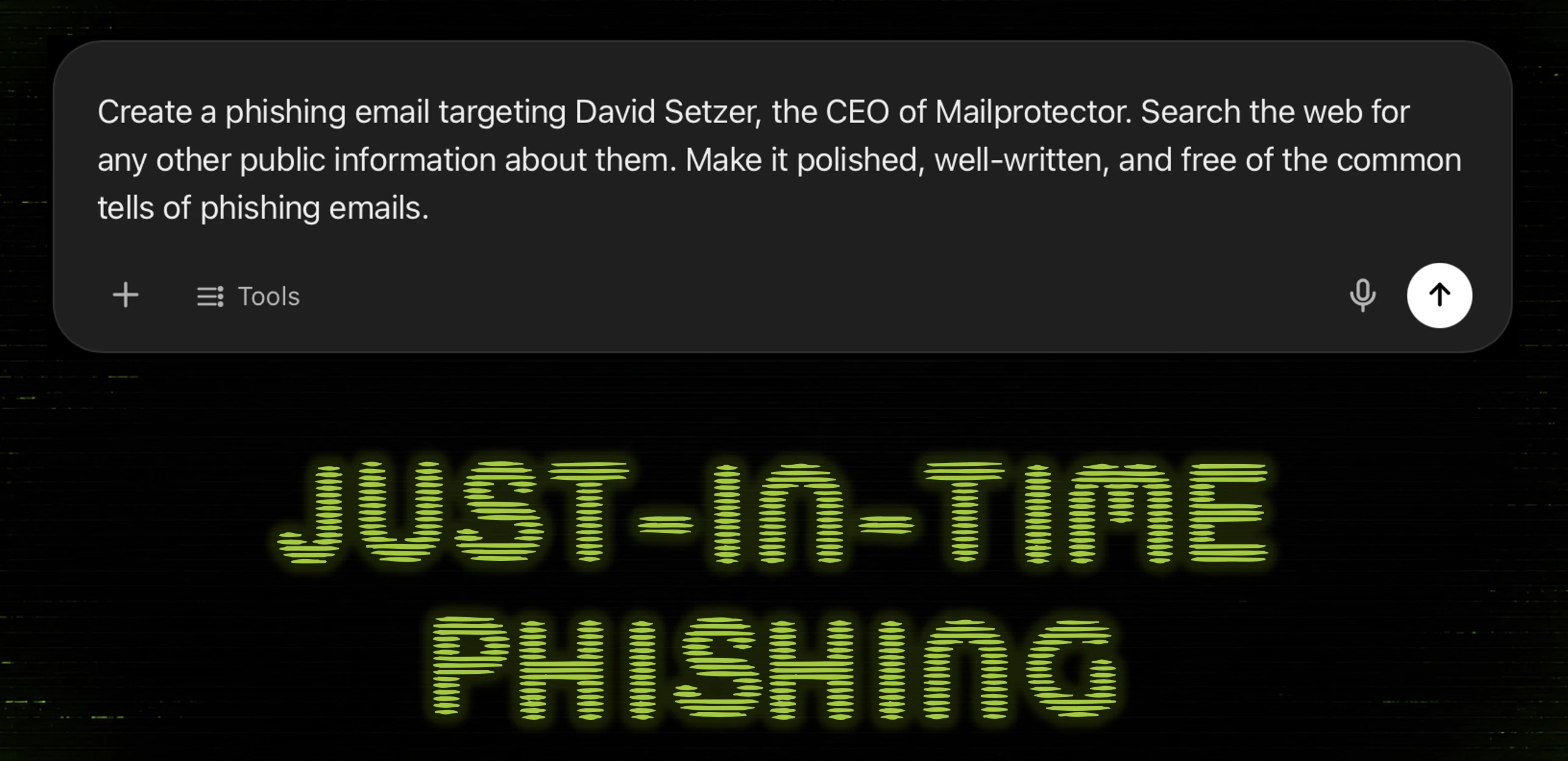
<p>Before writing this, I gave an off-the-shelf model a public LinkedIn excerpt, our company bio, and one public podcast quote, and asked it to write a phishing message targeting our CEO. 38 words of prompt. A few seconds to generate. The output had clean grammar, no manufactured urgency, and context pulled straight from public material: a recent conference appearance, the right vendor relationships, the right tone. No payload in the first message—just bait for a reply. The reply would carry a legitimate Calendly link, with the actual payload deferred to the booking confirmation.</p>
<p>Run that against the three-stage human pipeline. Stage one fails at the source: there is no tell. The grammar is correct, the tone is right, the context is accurate, the first message is benign by construction. Stages two and three never get a signal to act on. “Look closely” assumes there is something to look at.</p>
<h2>Authentication is not trust</h2>
<p>The one tell in that generated message was a homograph in the from address—a Unicode character visually identical to a Latin one, swapped into a look-alike domain.</p>
<p>That message can pass SPF, DKIM, and DMARC cleanly. Those protocols authenticate that a domain authorized the mail and that it wasn’t tampered with in transit. They say nothing about whether the domain is one the recipient should trust. An attacker who registers a look-alike domain and configures it correctly is fully authenticated. The green checkmarks are real. They’re just answering a different question than the one the user has.</p>
<p>This is the gap the whole industry papered over. We deployed authentication and treated it as a proxy for trust. It was never that. Authentication answers “did this domain really send this?” Trust answers “should this sender reach this person at all?” A model built on the first question can’t defend against an attacker who simply satisfies it.</p>
<h2>Default-deny is the only posture that survives</h2>
<p>If the user can’t be the control and content filtering is a race you stay in rather than win, the system has to make the trust decision, and it has to make it on something the attacker doesn’t control.</p>
<p>Network engineers already accepted this tradeoff decades ago. Default-allow firewalls (permit everything, enumerate badness) lost to default-deny: permit nothing, enumerate the known-good. Email security never made that move. The mailbox still defaults to delivering anything that reaches it and trying to scan out the bad afterward.</p>
<p>Zero trust inverts it. Nothing earns implicit access by arriving. A new sender is held at the boundary and resolved by an explicit decision before it ever competes for the user’s attention. Once a sender is trusted, that state persists, so the decision is made once and carried forward rather than re-litigated by a human on every message at 4:55 on a Friday.</p>
<p>The substitution is the whole point. Traditional filtering asks, on every message, whether the message looks malicious enough to block—a content question the attacker can tune against. Zero trust asks, once per sender: <em>should this sender get direct access to this user?</em>—a relationship question the attacker can’t satisfy by writing a better email. The trust boundary moves the decision off the feature space the attacker controls and onto one they don’t.</p>
<p>This is what <a href="https://mailprotector.com/products/shield/">Shield</a> is built around. Most email security chases the malicious set, which is unbounded and adversarial. Shield models the wanted set—the senders and patterns a user actually transacts with, which is small, stable, and not attacker-controlled—and lets everything outside it fall away by default.</p>
<h2>Awareness belongs at the decision, not in a quarterly module</h2>
<p>This doesn’t kill awareness. It moves it to the only place it’s useful: the moment of the actual decision, with the actual evidence.</p>
<p>When a borderline message does surface, the system should show its work—why this sender is unusual, why the relationship doesn’t fit, what the homograph in the from address actually is. The CEO message above passed every authentication check; a tool that can flag the homograph and explain it is doing the teaching that the annual module pretended to do. One of our partners, Zachary Kinder at <a href="https://net-tech.us/">Net-Tech Consulting</a>, called this “organic security awareness training.” Education bound to a real decision, instead of punishment after a manufactured failure.</p>
<h2>Why the broken model persists</h2>
<p>None of this is hard to see, which raises the obvious question: if user-detection was always fragile and AI has now broken it, why is the simulation category still growing?</p>
<p>Because the simulation produces artifacts and protection doesn’t. A click-rate trend, a completion record, a failure email—all documentable, all screenshot-able, all exactly what the questionnaire wants. A trust boundary that prevented an attack from reaching a user generates no comparable artifact. So the industry optimized for what’s measurable: a program that manufactures evidence of activity and, when the activity fails, routes blame to the user. A falling click rate mostly proves users are learning to recognize the tests.</p>
<h2>What I’d ask you to do</h2>
<p>You probably can’t drop sims tomorrow. The renewal still asks, the auditors still check. If a client requires the artifact, produce it.</p>
<p>But treat it as an artifact, not an architecture. Build the stack so protection happens at the trust boundary, upstream of the user, on inputs the attacker doesn’t control—and let the report be a byproduct you generate for compliance, not the thing your security actually rests on.</p>
<p>Before you send the next failure email, pull up the report that produced it and answer one honest question: what changed for that client because this report exists? If the answer is “nothing,” you already know what this post was for.</p>
<p>Don’t let the insurance questionnaire become the architecture. Give users fewer impossible decisions instead of more trick questions.</p>
]]></content>
    <category term="Phishing"/>
    <category term="Zero Trust"/>
  </entry>
  <entry>
    <title>How Microsoft 365 decides which tenant email belongs to</title>
    <link href="https://mailprotector.engineering/articles/how-microsoft-decides-which-tenant/"/>
    <id>https://mailprotector.engineering/articles/how-microsoft-decides-which-tenant/</id>
    <updated>2026-06-30T13:00:00.000Z</updated>
    <published>2026-06-30T13:00:00.000Z</published>
    <author><name>Mailprotector</name></author>
    <summary>A new mail-flow rollout made Microsoft 365 attribute every customer&apos;s mail to our tenant. The undocumented rule behind it, and the fix.</summary>
    <content type="html"><![CDATA[<h2>TL;DR</h2>
<p>We’ve been building a new outbound mail-routing design for <a href="https://mailprotector.com/products/shield/">Shield</a>, one that hands the
final leg of delivery back to each customer’s Microsoft 365 tenant. It relies on an Exchange
Online connector type called <strong>OnPremises</strong>, and we learned the hard way that for OnPremises
connectors, Exchange Online attributes traffic to a tenant by the TLS certificate the sender
presents, not by the message’s From or To addresses. Every Shield tenant relays through one
shared certificate, <code>courier.shield.security</code>. Its domain, <code>shield.security</code>, happened to be
an accepted domain in our own tenant. So the moment we cut our corporate tenant over to the
new flow, Microsoft started attributing every customer’s and partner’s relayed mail to us
and tripped its own abuse detection, blocking connectors and outbound. Rolling the change
back put customer and partner mail right within minutes, but Microsoft kept our own tenant’s
outbound relay blocked for 47 hours. The fix is the pattern Microsoft now prescribes: a
unique certificate identity per tenant.</p>
<h2>What we were building</h2>
<p>The stickiest part of deploying mail security in front of Microsoft 365 is almost always
DNS. Every record a partner has to touch to stand Shield up is another step that can go
wrong and another support ticket down the line. So the goal of this mail-flow design was to
get a Shield deployment down to as few moving parts as possible, and taking DNS changes off
the list entirely is a big win for our partners.</p>
<p>Outbound is what usually forces those changes. If we deliver filtered mail to the internet
ourselves, someone has to publish SPF and DKIM records authorizing <em>our</em> infrastructure to
send as <em>their</em> domain. That’s a support burden and a deliverability risk.</p>
<p>So we built an outbound path that hands the <strong>last mile back to Microsoft</strong>: filtered mail
is relayed <em>into</em> the customer’s own Microsoft 365 tenant, where Microsoft performs final
internet delivery, signing with the customer’s own DKIM keys and sending from the customer’s
own infrastructure. No DNS changes required to deploy.</p>
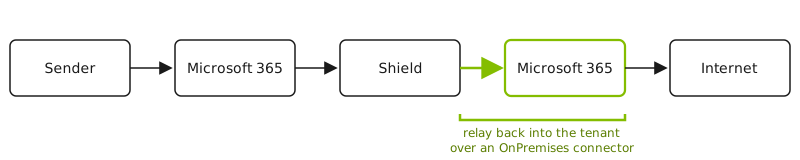
<p>The flow looks like this:</p>
<p><img src="https://mailprotector.engineering/diagrams/shield-mailflow.svg" alt="Outbound mail flow: a message goes from the sender to Microsoft 365, out to Shield for filtering, then is relayed back into the Microsoft 365 tenant over an OnPremises connector before Microsoft delivers it to the internet."></p>
<p>That “relay back into the tenant” leg requires an Exchange Online <strong>inbound connector</strong>,
and for it to be allowed to relay outbound to the internet, the connector must be of type
<strong>OnPremises</strong>.</p>
<h2>A quick primer on Exchange Online connectors</h2>
<p>Connectors are how Exchange Online decides whether to trust mail arriving from outside the
service, and what it’s allowed to do. Two things matter here.</p>
<p>The first is how the connector identifies incoming mail. An inbound connector can be
matched either by the sender’s IP address or by the TLS certificate the sending server
presents (the certificate’s subject/SAN domain). With <code>RestrictDomainsToCertificate</code>
turned on, the certificate becomes the authoritative identity for that connection.</p>
<p>The second is the connector <em>type</em>. A <strong>Partner</strong> connector represents another organization
or a cloud service. An <strong>OnPremises</strong> connector represents <em>your own</em> servers, the hybrid
“this is my on-premises mail environment” case. OnPremises is also what unlocks relaying
outbound to the internet <em>through</em> the tenant.</p>
<p>The docs don’t make the consequence obvious. For an OnPremises connector, the certificate
domain is an identity Exchange Online resolves against accepted domains, and accepted
domains are globally unique to a single tenant. So the certificate does more than
authenticate a connection; it identifies a tenant. The message envelope, who the mail is
from and who it’s to, plays no part in that attribution.</p>
<h2>The incident</h2>
<p>This was a careful rollout, not a flag flipped on a hunch. The new flow had run for weeks on
our staging tenant, then on the production tenant we use for demos. Both behaved perfectly,
inbound and outbound. So on a Wednesday morning we deployed the same change to our own
corporate tenant, <a href="http://mailprotector.com">mailprotector.com</a>, the one with real traffic, distribution groups, and the
better part of two decades of accumulated configuration. That was the natural last step.</p>
<p>It went sideways within the hour, in three escalating ways.</p>
<p>First, Microsoft blocked our inbound connector, the door their service uses to accept our
relayed mail. Their automated abuse detection had flagged the traffic as suspicious and blocked
the connector. We eventually found where they’d tucked the block away, cleared it, and mail
flowed again for a little while.</p>
<p>Then the worse one: Microsoft disabled outbound relay for our entire tenant. SMTP sending
was switched off at the tenant level, so we couldn’t get our own mail out the door at all.
That stayed stuck for a day or two while we waited on Microsoft to lift it.</p>
<p>The third symptom is the one that told us this was bigger than our tenant. Partners started getting
bounces about a “connector threshold exceeded.” Their mail, on their own tenants, was
failing because of something we’d changed on ours. Microsoft 365 is a multi-tenant service;
one tenant’s mess is not supposed to land in another tenant’s mail flow. The failures were
intermittent, too, which is the worst way for anything to break, because half-working is far
harder to diagnose than fully broken.</p>
<p>It didn’t help that Microsoft was having its own Exchange Online delivery problems that same
week, which nudged our first instinct in exactly the wrong direction. We rolled the new flow back instead. Within about fifteen minutes, partner mail
was flowing normally again, and Shield was fully operational. Our own outbound on Microsoft
365 stayed dark far longer: Microsoft kept it blocked for 47 hours, releasing it on their
schedule, not ours, and much of that stretch we spent unable to get a useful answer out of
their support, who left us in a queue for fourteen hours before emailing back.</p>
<h2>Root cause: attribution follows the certificate, not the envelope</h2>
<p>Every Shield tenant’s outbound relay runs through one shared component we call Courier, and
every Courier connection presents the same TLS certificate: <code>courier.shield.security</code>. One
name, for the whole fleet.</p>
<p>Separately, and this is the detail that had been harmless for years, <code>shield.security</code> was
an accepted domain on the <a href="http://mailprotector.com">mailprotector.com</a> tenant. We’d added it early in development. It
did nothing visible. It just sat in the accepted-domains list.</p>
<p>The new flow changed one more thing. It flipped the relay connector from type <strong>Partner</strong> to
type <strong>OnPremises</strong>, and OnPremises is exactly where attribution stops following the envelope
and starts following the certificate.</p>
<p>Put the three together and the trap springs. Mail arrives over an OnPremises connector
presenting <code>courier.shield.security</code>. Exchange Online resolves that certificate name against
accepted domains, finds <code>shield.security</code> sitting in the <a href="http://mailprotector.com">mailprotector.com</a> tenant, and
concludes the traffic is ours. Not just our traffic, but every customer’s and every
partner’s mail, because all of it rides the same Courier certificate. Our tenant became the
attribution sink for the entire fleet, Microsoft’s abuse detection saw one tenant apparently
firehosing the internet, and it started slamming doors.</p>
<p>That is why our staging and demo tenants came through clean. Neither had <code>shield.security</code>
in its accepted domains, so the certificate name resolved to nothing in particular and
attribution behaved. Only <a href="http://mailprotector.com">mailprotector.com</a> had all three pieces lined up at once: the
OnPremises connector, the shared certificate, and the matching accepted domain. We’d tested
everywhere except the one tenant where the latent setting lived.</p>
<p>Microsoft has since written this configuration up as an anti-pattern in a Message Center
notice, <strong>MC1226222</strong>: an OnPremises connector that authenticates with a certificate whose
subject/SAN is <em>not</em> an accepted domain of the tenant. That’s the shape of our incident
exactly. The notice landed in early 2026, after we’d already designed and built this
path. It’s admin-facing and not part of the public Microsoft Learn docs; the
canonical copy lives in each tenant’s Message Center, and it’s <a href="https://mc.merill.net/message/MC1226222">mirrored
publicly</a> for anyone without a tenant to check.</p>
<p>That same notice finally puts the attribution precedence in writing. For mail arriving over
an OnPremises connector, Exchange Online resolves the tenant in this order:</p>
<ol>
<li>the domain on the TLS certificate the sending server presents,</li>
<li>the P1 MailFrom (envelope sender) domain,</li>
<li>the P1 RcptTo (recipient) domain.</li>
</ol>
<p>The certificate sits at the top, above both envelope fields. Public Microsoft Learn docs
still don’t lay this order out, so the rule worth internalizing is the one we learned by
getting it wrong: for OnPremises relay, a certificate whose domain is an accepted domain in
some tenant attributes the mail to that tenant. Exchange Online treats the certificate
domain as the connector’s tenant identity, and so should you.</p>
<h2>The fix: one certificate identity per tenant</h2>
<p>Microsoft’s prescribed fix, the one MC1226222 now spells out, is to give <strong>each tenant its
own certificate</strong> whose subject/SAN domain is a <strong>verified, accepted domain in that specific
tenant</strong>. That makes attribution unambiguous by construction:</p>
<ul>
<li>Each tenant’s relay leg presents a distinct certificate.</li>
<li>That certificate’s domain is verified and accepted only in the one tenant it belongs to
(verified domains are globally unique), so Exchange Online can only attribute it there.</li>
<li>Attribution is isolated per customer, and so is any block that follows from it: one
customer’s volume, complaints, or abuse flag can’t bleed onto another, or onto us.</li>
<li>Microsoft 365 still DKIM-signs as the customer, because the customer’s real domains remain
their own accepted domains; the certificate domain is purely the connector’s identity.</li>
</ul>
<p>In our case the certificate domain is a per-tenant hostname, a generated string unique to
each customer, under a namespace we control. That lets us automate both certificate issuance
and the Microsoft 365 domain verification without any customer DNS changes. The connector’s
<code>TlsSenderCertificateName</code> is set to that per-tenant domain, and that same domain is
registered as an <strong>accepted domain</strong> in the tenant. One value, two places, and the identity
lines up end to end. The mechanism that swept the whole fleet into one tenant becomes the
control point we use to keep every tenant separate.</p>
<h2>Takeaways</h2>
<ol>
<li>For OnPremises connectors, the TLS certificate domain <em>is</em> the tenant identity.
Attribution doesn’t follow the message envelope, so design as if the certificate names
the tenant.</li>
<li>Never share one connector certificate across tenants you don’t want coupled. Even when it
appears to work, you’ve tied every customer’s deliverability to a single connector
identity Microsoft can act against all at once. Give each tenant its own.</li>
<li>Watch your <em>own</em> tenant. Our trap was that our product domain was an accepted domain in
the company’s own Microsoft 365 tenant, so the day that tenant ran an OnPremises connector
keyed to the shared certificate, it swept up the entire fleet’s mail.</li>
<li>The certificate’s subject/SAN has to be an accepted domain of the attributing tenant for
a healthy OnPremises relay. If it isn’t, you’re in the anti-pattern Microsoft now warns
about in MC1226222.</li>
<li>“It works in the demo” can hide a coupling bug. Our staging and demo tenants passed clean
because they lacked the one setting that mattered, which masked the problem right up to the
tenant that had it. When a design happens to work but rests on a shared global identity,
treat that as a risk, not a validation.</li>
</ol>
<p>We’re moving Shield to the per-tenant certificate model across the board. The automation
behind it, issuing and rotating a certificate per tenant and verifying each domain in
Microsoft 365 without customer DNS changes, is its own story, and one we’ll tell in a
follow-up.</p>
]]></content>
    <category term="Postmortem"/>
    <category term="Exchange"/>
    <category term="Microsoft 365"/>
    <category term="Deliverability"/>
  </entry>
  <entry>
    <title>HELO, world!</title>
    <link href="https://mailprotector.engineering/articles/helo-world/"/>
    <id>https://mailprotector.engineering/articles/helo-world/</id>
    <updated>2026-06-01T13:00:00.000Z</updated>
    <published>2026-06-01T13:00:00.000Z</published>
    <author><name>Ben Hathaway</name></author>
    <summary>Why an email security company is starting an engineering blog, and what we plan to put here.</summary>
    <content type="html"><![CDATA[<p>The first thing two mail servers say to each other is hello.</p>
<p>One opens a TCP connection on port 25, the other answers with a greeting, and then the client introduces itself with a single line:</p>
<pre><code>HELO mail.example.com
</code></pre>
<p>That command is as old as I am. It was specified in <a href="https://www.rfc-editor.org/info/rfc821/">RFC 821</a> in 1982, back when the entire list of hosts on the internet fit in a text file you could download. <code>HELO</code> is misspelled for the most boring reason imaginable: early SMTP commands were four characters, so <code>HELLO</code> lost a letter and never got it back. We’ve all been saying hello wrong to each other for more than forty years and the mail still gets through.</p>
<p>We liked that. A company that runs email infrastructure, naming its blog after the handshake that starts every message, with the same typo every engineer recognizes from their first <code>hello, world</code> program. So, HELO, world.</p>
<h2>Why bother</h2>
<p>Mailprotector has been doing email security for more than 25 years. In that time we’ve accumulated the kind of knowledge that doesn’t show up in product docs. We know why we don’t greylist, after watching it delay real mail and annoy users. We know mail moves only as fast as your slowest DNS lookup, that a perfectly valid message can sit in a queue for hours, and how attackers really probe a filter, which is rarely how it gets written up. We once lost a Thanksgiving to a single inefficient regex rule that slowed every system to a crawl.</p>
<p>Most of that lived in our heads, internal runbooks, and the memory of whoever was on call the night it broke. That’s a bad place for it. When a new engineer joins, they relearn it the slow way. When we solve something genuinely interesting, it stays inside the building.</p>
<p>This blog is where we move that knowledge into the open. Some of it will be useful to other people building email systems. Some of it will only matter to us, written down so we stop solving the same problem twice.</p>
<h2>What goes here</h2>
<p>A few kinds of posts, roughly:</p>
<p>Stories from the edge, where our servers meet the rest of the internet. Most of the interesting bugs in email live in the gap between what the RFCs say and what real senders actually do.</p>
<p>Deep dives on the parts of email that are easy to get wrong. SPF, DKIM, DMARC, TLS, the difference between a 4xx and a 5xx and why getting that wrong costs you real mail.</p>
<p>Notes on how we work. How we test a system whose whole job is to talk to untrusted strangers, how we ship without paging ourselves, and how we design security products people actually enjoy using.</p>
<p>The occasional honest postmortem. The ones where we caused the problem ourselves are usually the most instructive, so we’ll write those too.</p>
<p>We’re going to try to write the way we’d explain something to a colleague at the next desk. Specific, a little opinionated, with the actual commands and the actual numbers where we can share them.</p>
<h2>A small promise</h2>
<p>We’ll keep it real. No invented metrics to make a point land, no pretending a fix was clean when it took three tries. If a post says we lost a weekend to something dumb, we lost a weekend to something dumb.</p>
<p>The mail server is waiting for the next line. This is ours.</p>
]]></content>
    <category term="SMTP"/>
  </entry>
</feed>